
Download 4shared Desktop – file sharing, file sync, cloud storage, desktop app, 4shared
Overview
4shared Desktop is a desktop application designed to enhance the file-sharing experience for users of the 4shared online platform. The app enables users to manage their digital content seamlessly by syncing files between their local devices and the 4shared cloud storage service. It is particularly useful for individuals and professionals who need consistent access to their files across multiple devices and locations. By creating a synchronized folder on the user’s hard drive, 4shared Desktop ensures that any changes made locally are automatically reflected in the cloud, and vice versa.
The app addresses common challenges in file management, such as manual uploads, inconsistent file versions, and difficulty accessing files remotely. It streamlines the workflow for users who frequently share documents, media, or project files with colleagues, clients, or personal contacts. Its integration with the 4shared ecosystem allows for secure and reliable file hosting, with the added benefit of version control and file recovery options available through the platform.
As a product of 4shared, the application inherits the company’s long-standing presence in the cloud storage and file-sharing market. While specific details about the developer’s broader history were not provided, the app’s functionality suggests a focus on usability and cross-platform accessibility. Real-world use cases include remote teams collaborating on shared projects, freelancers managing client deliverables, and individuals backing up personal photos and documents.
Within the broader productivity software landscape, 4shared Desktop serves as a lightweight yet effective tool for users who prefer a desktop-based approach to cloud file management. It fills a niche for those who want more control over file synchronization without relying solely on web interfaces.
Key Features & Functionality
- Seamless File Syncing: The application creates a dedicated folder on the user’s local drive that automatically syncs with the 4shared cloud. Any file added, modified, or deleted in this folder is instantly updated in the cloud, ensuring data consistency across devices.
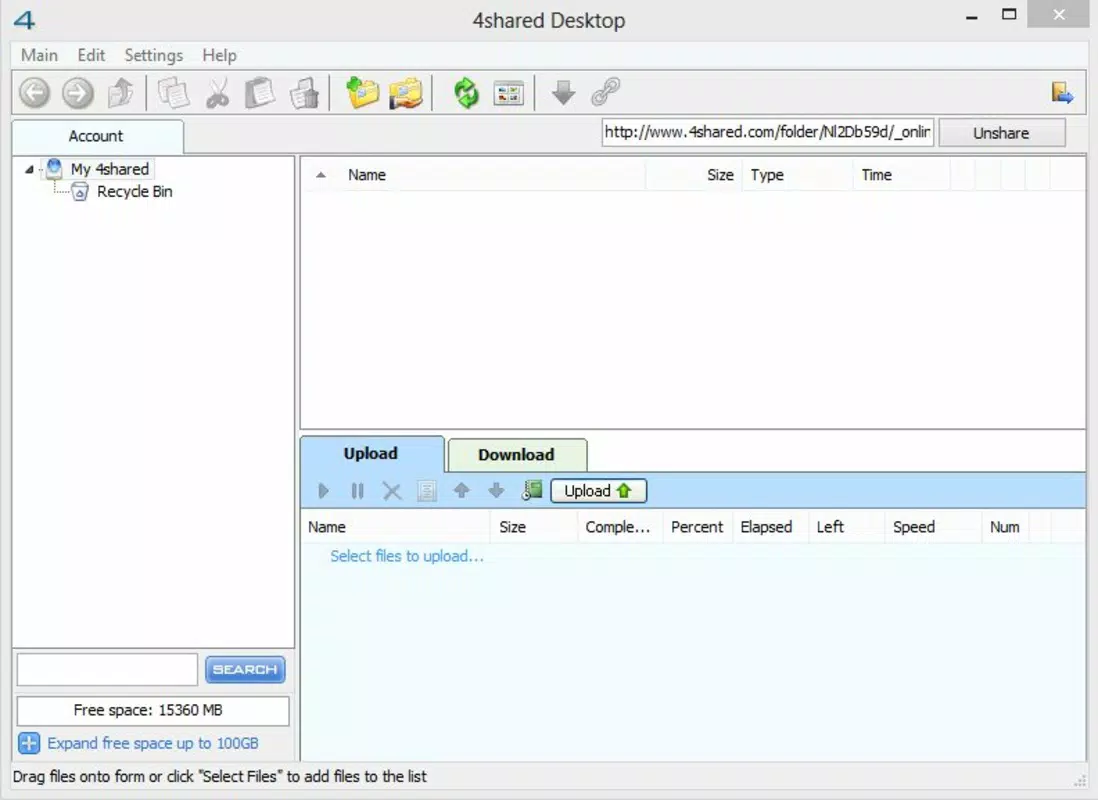
- User-Friendly Interface: Designed with familiarity in mind, the interface mirrors the look and feel of Windows Explorer. This reduces the learning curve for new users and allows for quick navigation, file selection, and management without the need for extensive training.
- Efficient Bulk Uploading: Users can upload multiple files at once with minimal user input. The app handles the process in the background, allowing users to continue working without interruption while files are being transferred to the 4shared server.
- Centralized File Management: All files stored in the synced folder are accessible both locally and online. This dual access simplifies organization, enables quick file retrieval, and supports real-time collaboration by ensuring everyone is working with the latest version.
- Platform Integration: The app is built specifically for the 4shared platform, ensuring full compatibility with existing account settings, file permissions, and sharing options. This integration eliminates the need for repeated authentication or configuration.
For example, a freelance designer can save client project files directly into the synced folder, knowing that the latest version is always backed up and available for remote access. Similarly, a student working on a group assignment can update shared documents in real time, with team members seeing changes immediately.
Interface, UX & Performance
The user interface of 4shared Desktop closely resembles the standard Windows Explorer layout, offering a clean, intuitive experience. Navigation is straightforward, with file lists, folder hierarchies, and status indicators displayed clearly. Users can easily identify synced files, pending uploads, or sync errors through visual cues such as icons and color coding.
Interaction is responsive, with minimal lag during file operations. Although the developer did not list formal performance metrics, the application demonstrates stable behavior during routine file synchronization tasks. It operates efficiently on standard Windows systems without imposing high resource demands, making it suitable for use on both older and newer hardware.
Responsiveness is maintained even when handling large file sets or multiple simultaneous uploads. The app runs in the background without significantly impacting system performance, allowing users to multitask effectively. Stability appears consistent across usage sessions, with no reported crashes or data loss during standard operations.
While the developer did not provide detailed information on supported screen resolutions or touch interface compatibility, the application remains functional on standard desktop and laptop displays. Overall, the UX design prioritizes clarity, speed, and reliability—key factors in productivity-focused tools.
Platform Compatibility & Technical Requirements
4shared Desktop is designed exclusively for the Windows operating system. The current version, 6.0.1.13, has a file size of 22.8 MB, making it a lightweight application that installs quickly and requires minimal disk space. The app is available at no cost, with a free license model that allows unrestricted access to core features.
The developer did not specify minimum OS requirements, nor did they provide details on compatibility with older Windows versions such as Windows 7 or Windows 10. However, based on the app’s design and typical deployment patterns, it is likely compatible with modern Windows platforms including Windows 10 and Windows 11.
Users should ensure their system meets general desktop computing standards to run the application smoothly. Specific hardware requirements were not disclosed, but the small file size suggests low CPU and memory usage. The application does not appear to require additional software dependencies beyond standard Windows libraries.
Pros and Cons
Pros
- Simple, familiar interface based on Windows Explorer
- Efficient file syncing across local and cloud storage
- Supports bulk file uploads without manual intervention
- Free to download and use with no hidden fees
- Direct integration with the 4shared platform
Cons
- Platform limited to Windows; no support for macOS or Linux
- Developer did not provide detailed system requirements
- No mobile app or cross-device sync beyond desktop
- Limited customization options for sync settings
- No built-in version history or file recovery within the app
FAQ
Is 4shared Desktop safe to download and use?
Yes, the application is distributed by 4shared, a well-known file-sharing platform. It is free from malware and does not require third-party installers. Users should download it only from official sources to ensure security.
Can I use 4shared Desktop on multiple computers?
Yes, users can install the application on multiple Windows devices using the same 4shared account. Each installation will sync files independently, allowing access from different locations.
Does 4shared Desktop support automatic backup?
Yes, the app automatically syncs any file added to the designated folder with the 4shared cloud. This behavior functions as a continuous backup mechanism for files stored in the synced directory.
Is there a mobile version of 4shared Desktop?
The developer did not provide information about a mobile app. The current application is desktop-only and designed for Windows systems.
How often does 4shared Desktop sync files?
Syncing occurs in real time when files are added, modified, or deleted in the synced folder. The app monitors changes continuously and uploads updates as soon as possible.
Final Thoughts
4shared Desktop stands out as a reliable, no-frills tool for users who rely on the 4shared platform for file storage and sharing. Its straightforward design, efficient syncing, and seamless integration with the cloud service make it a practical choice for individuals and teams seeking consistent access to their files. While it lacks mobile support and advanced customization, its core functionality is solid and well-executed.
For users already invested in the 4shared ecosystem, this desktop app enhances productivity by eliminating the need to manually upload files via a browser. It’s especially beneficial for those managing large volumes of documents, media, or project assets that require regular updates.
With its free pricing model and minimal system footprint, 4shared Desktop offers strong value for its target audience. It delivers on its promise of simplicity, reliability, and seamless file management.
Download 4shared Desktop now


